ComputerWorld

ComputerWorldIndependent

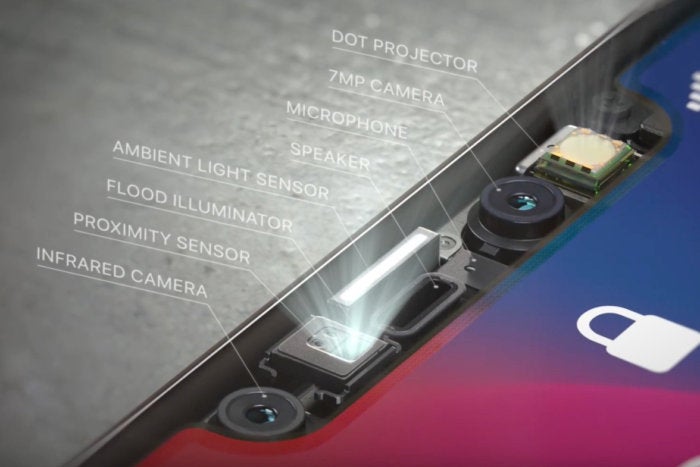
What is Face ID? Apple’s new authentication tech explained
Credit to Author: Michael deAgonia| Date: Wed, 01 Nov 2017 02:57:00 -0700

With just a glance, Face ID can unlock Apple’s new iPhone X, giving owners a new authentication paradigm for the first time since the arrival of Touch ID with the iPhone 5. Face ID – that’s Apple’s name for the technology – uses a complex front-facing camera system and accompanying software to unlock the iPhone and authenticate purchases and payments with a mere glance.

The futuristic-seeming tech is one of the iPhone X’s main selling points, along with its “Super Retina” OLED screen, slimmer, bezel-less form factor and improved camera. But it also raises questions about whether the technology is as easy and secure to use as the tried-and-true fingerprint-based Touch ID.

To read this article in full or to leave a comment, please click here

Read More
ComputerWorldIndependent

Apple putties Krack in macOS, iOS

Credit to Author: Gregg Keizer| Date: Tue, 31 Oct 2017 17:06:00 -0700

Apple on Tuesday patched both macOS and iOS against serious vulnerabilities in the Wi-Fi Protected Access II (WPA2) protocol used to secure wireless networks.

Information about the flaws, dubbed “Krack” by their Belgian discoverer, made news earlier in the month when security researcher Mathy Vanhoef announced weaknesses in WPA2 that could allow criminals to read information transmitted over a Wi-Fi network thought to be encrypted.

Krack, said Vanhoef, stood for “Key Reinstallation Attacks.”

The macOS 10.13.1 and iOS 11.1 updates addressed the Krack vulnerabilities, as well as a slew of others. The Mac update fixed a whopping 148 flaws, while the iPhone and iPad update quashed 20 bugs. The bulk of the macOS patches – 90 of the total – plugged holes in “tcpdump,” an open-source network packet analyzer that’s baked into the operating system.

To read this article in full or to leave a comment, please click here
Read More
ComputerWorldIndependent

Get Windows and Office patched – but watch out for creepy-crawlies

Credit to Author: Woody Leonhard| Date: Fri, 27 Oct 2017 13:23:00 -0700

Those of us who have to keep Windows 10 working have hit yet another rough course. This month’s patches haven’t been pretty. In fact, if your admin set the WSUS or SCCM update servers to automatically approve Windows 10 updates, you may have had to deal with oceans of blue screens.

Right now, the biggest threat is not KRACK – Computerworld‘s Gregg Keizer has an overview here and the Krackattacks.com site has the latest details; it hasn’t (yet) started infecting normal Windows users. The big threat now is from that Wacky Wascal BadRabbit, which started with a fake Flash update on a Russian site and an ancient DDEAUTO field exploit in Word (and Excel and Outlook and OneNote) and is being used to carry Locky and other ransomware.

To read this article in full or to leave a comment, please click here
Read More
ComputerWorldIndependent

Throwback Thursday: Whose idea was this, anyway?

Credit to Author: Sharky| Date: Thu, 26 Oct 2017 03:00:00 -0700

This pilot fish is in charge of computing facility operations, and he takes security seriously.

“As part of trying to do the ‘right’ thing, I instituted some policies, such as regular password changes, regular checks and purges of our password files, group files and user database,” says fish.

But he knows that, for some people, that’s not enough. So fish and his team decide to post a list of the worst password policy violators — who’s using old passwords and how long it’s been since they’ve been changed.

That way, everyone will see just how bad things can get when people aren’t paying attention.

A team member puts together the list, then brings it to fish and says, “Would you look this over before I post it?”

To read this article in full or to leave a comment, please click here

Read More
ComputerWorldIndependent

Now THAT'S what we call security!

Credit to Author: Sharky| Date: Mon, 23 Oct 2017 03:00:00 -0700

IT consultant gets a gig doing work for a government agency that frequently handles top-secret documents — and it gets a bit surreal at times, reports a pilot fish in the know.

“When Fred would get to work, a guard armed with an assault rifle would turn on a red light,” fish says. “That signaled all employees to cover their papers and turn off their monitors.

“Fred would then be escorted through cubeville — with the eyes of every employee on him — to a windowless office, where he would be locked in. The process repeated at the end of the day — he had to phone the guard to come get him.

“But what about bathroom breaks? The same process was followed, except the guard had to accompany Fred into the restroom, and Fred had to remain in the guard’s direct line of sight at all times to prevent loss of restricted data.

To read this article in full or to leave a comment, please click here

Read More
ComputerWorldIndependent

Anatomy of a spambot

Credit to Author: John Brandon| Date: Thu, 19 Oct 2017 03:00:00 -0700

For security pros, spambots are known enemies. For the uninitiated, they are unknown entities. And yet they proliferate like ants at a picnic or teens on messaging apps. You might be receiving countless messages from bots every day, and even worse, a bot might be sending out unwanted emails from your computer right now, making you an unwilling participant in digitized mayhem.

To read this article in full or to leave a comment, please click here

(Insider Story)

Read More